
What you will learn
- 2.4 GHz vs 5 GHz vs 6 GHz: range, walls, crowding and capacity
- Non-overlapping 2.4 GHz channels 1, 6 and 11 (U.S., 20 MHz); channel width and regulations
- 802.11a/b/g/n/ac/ax and Wi-Fi 4, 5, 6 and 6E
- Bluetooth, NFC and RFID
- WEP, WPA/TKIP, WPA2/AES and WPA3
- Personal (SAE) vs Enterprise (802.1X with RADIUS)
- Why hiding an SSID is not security
PRACTICE TESTS
Ready to drill it?
Practice tests for CompTIA A+ Core 1 and Core 2, every answer explained and checked against published sources. $19.95 for 30 days, plus sales tax where it applies; one payment, nothing renews.
See the 30-day passCheat sheet
Everything in this lesson on one page. Free to save, print and share.
Download the cheat sheet (PNG)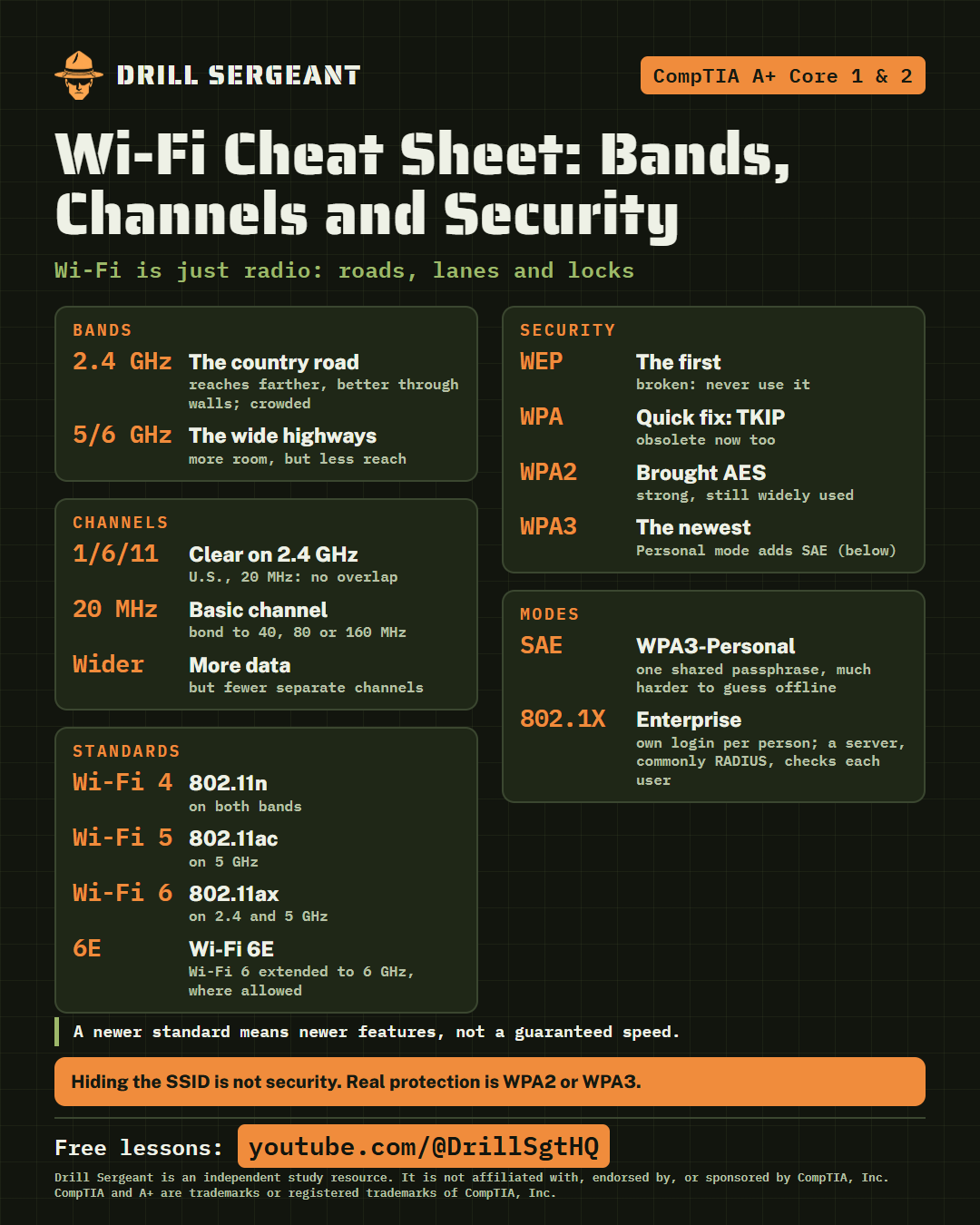
Cheat sheet as text
Wi-Fi Cheat Sheet: Bands, Channels and Security
Wi-Fi is just radio: roads, lanes and locks
Bands
| Key | Meaning | Note |
|---|---|---|
| 2.4 GHz | The country road | reaches farther, better through walls; crowded |
| 5/6 GHz | The wide highways | more room, but less reach |
Channels
- 1/6/11 — Clear on 2.4 GHz: U.S., 20 MHz: no overlap
- 20 MHz — Basic channel: bond to 40, 80 or 160 MHz
- Wider — More data: but fewer separate channels
Standards
| Key | Meaning | Note |
|---|---|---|
| Wi-Fi 4 | 802.11n | on both bands |
| Wi-Fi 5 | 802.11ac | on 5 GHz |
| Wi-Fi 6 | 802.11ax | on 2.4 and 5 GHz |
| 6E | Wi-Fi 6E | Wi-Fi 6 extended to 6 GHz, where allowed |
Security
| Key | Meaning | Note |
|---|---|---|
| WEP | The first | broken: never use it |
| WPA | Quick fix: TKIP | obsolete now too |
| WPA2 | Brought AES | strong, still widely used |
| WPA3 | The newest | Personal mode adds SAE (below) |
Modes
| Key | Meaning | Note |
|---|---|---|
| SAE | WPA3-Personal | one shared passphrase, much harder to guess offline |
| 802.1X | Enterprise | own login per person; a server, commonly RADIUS, checks each user |
A newer standard means newer features, not a guaranteed speed.
Hiding the SSID is not security. Real protection is WPA2 or WPA3.
Chapters
Exam objectives covered
- Core 1 (220-1201) objective 2.2, Networking
- Core 2 (220-1202) objective 2.3, Security
- Core 2 (220-1202) objective 2.10, Security
Transcript
Read the full lesson narration
Wi-Fi is radio: the three bands
Wi-Fi is just radio. Once you see it that way, the exam questions get a lot easier.
Your Wi-Fi router talks to your devices with radio waves, on up to three frequency bands: 2.4, 5, and, on newer gear, 6 GHz. Think of them as roads. 2.4 GHz is the old country road. It usually reaches farther and gets through walls better, but it's crowded. Bluetooth, cordless gadgets, and even microwave ovens can interfere with it. 5 and 6 GHz are the wide new highways. More lanes, more room for traffic, but they don't reach as far, and walls stop them sooner.
Channels 1, 6 and 11, and channel width
Each band is split into channels, like lanes. In the U.S., Wi-Fi on 2.4 GHz normally uses channels 1 through 11, and they overlap. At the standard width of 20 MHz, only three stay clear of each other: channels 1, 6, and 11. That's the classic exam answer for a 2.4 GHz channel plan. The basic channel is 20 MHz wide. Channels can be bonded into 40, 80, or even 160 MHz, which is practical mainly on 5 and 6 GHz, where there are many more channels. Wider channels carry more data, but leave fewer separate channels for your neighbors. And each country's regulators decide which channels are allowed, so the list changes from place to place.
802.11 standards and Wi-Fi 4, 5, 6, 6E
The standards all start with 802.11, followed by letters. The early ones were 802.11b and 802.11g on 2.4 GHz, and 802.11a on 5 GHz. Later, the Wi-Fi Alliance added friendlier names, and applied them to older standards too. Wi-Fi 4 is 802.11n, on both bands. Wi-Fi 5 is 802.11ac, on 5 GHz. Wi-Fi 6 is 802.11ax, on 2.4 and 5 GHz. And Wi-Fi 6E is Wi-Fi 6, extended to the 6 GHz band, where that's allowed. One warning. A newer standard means newer features, not a guaranteed speed. Real speed depends on signal, interference, channel width, and what both devices support.
Bluetooth, NFC and RFID
The exam also covers three short range radios. Bluetooth connects personal gear, like headsets, keyboards, and mice, across a room, after you pair the devices. NFC, near field communication, works only when devices almost touch, a few centimeters. That's how you tap to pay. And RFID, radio frequency identification, lets a reader pick up small tags, like the ones in ID badges and inventory labels. Many tags have no battery at all. The reader's signal powers them.
WEP, WPA, WPA2, WPA3, TKIP and AES
Now, security. Wi-Fi protection has four generations. WEP was the first, and it's broken. Never use it. WPA came next, as a quick fix, using TKIP. That's obsolete now too. WPA2 brought AES, strong encryption that's still widely used. And WPA3 is the newest. For the exam, pair them up: TKIP is the old one, and AES is the strong one.
Personal vs Enterprise (SAE, 802.1X, RADIUS)
WPA2 and WPA3 each come in two modes. Personal mode uses one shared passphrase, the Wi-Fi password you type at home. WPA3-Personal protects that password with a method called SAE, which makes guessing it offline much harder. Enterprise mode gives every person their own login instead. It uses 802.1X, and an authentication server, commonly RADIUS, checks each user. So when someone leaves the company, you turn off one account, not change the password for everyone.
Hidden SSIDs, and the recap
One classic trap. Hiding your network name, the SSID, is not security. It only keeps the name off the usual list. The network can still be discovered with the right tools. Real protection is WPA2 or WPA3, with a strong password or individual logins.
Lock in these four. One. 2.4 GHz reaches farther but is crowded. 5 and 6 GHz carry more but reach less. Two. In the U.S., at 20 MHz, use 2.4 GHz channels 1, 6, and 11. Three. Wi-Fi 4 is 802.11n. Wi-Fi 5 is 802.11ac. Wi-Fi 6 is 802.11ax, and 6E adds the 6 GHz band. Four. Use WPA2 or WPA3 with AES. WEP and TKIP are obsolete.
That's wireless. Now go prove it. Practice questions are waiting for you in Drill Sergeant.
PRACTICE TESTS
Ready to drill it?
Practice tests for CompTIA A+ Core 1 and Core 2, every answer explained and checked against published sources. $19.95 for 30 days, plus sales tax where it applies; one payment, nothing renews.
See the 30-day passRelated lessons
Found a mistake in a lesson? Email support@drillsgthq.com with the lesson and what is wrong.
Drill Sergeant is an independent study resource. It is not affiliated with, endorsed by, or sponsored by CompTIA, Inc. CompTIA and A+ are trademarks or registered trademarks of CompTIA, Inc.