
Self-check: which port is it?
Say the answer out loud, then open it.
An encrypted command line on a remote computer?
22, SSH
Remote Desktop: the whole Windows desktop?
3389, RDP
Sending mail, and moving it between mail servers?
25, SMTP
Turning names into numbers?
53, DNS
Windows file and printer sharing?
445, SMB
Encrypted web traffic?
443, HTTPS
Plain web traffic?
80, HTTP
Handing out IP addresses?
67 and 68, DHCP
Reading mail that stays on the server, with every device in sync?
143, IMAP
Reading mail by downloading it to one device?
110, POP3
Directory lookups, like Active Directory?
389, LDAP
Moving files, unencrypted? Which port carries the commands?
21 (20 carries the data in active mode), FTP
The old remote command line with no encryption by default?
23, Telnet
The older way Windows PCs find each other on a local network?
137-139, NetBIOS
Port 3389?
RDP, Remote Desktop
Port 445?
SMB, Windows file and printer sharing
Port 389?
LDAP, directory lookups
On the job: pinging the server works, but Remote Desktop fails. What do you check?
Whether a firewall blocks port 3389, and that the Remote Desktop service is running. Ping uses no port, so a reply only shows the server answers ping
What you will learn
- What a port number is, and why it is a default rather than proof
- TCP vs UDP, and which listed protocols use UDP
- HTTP 80, HTTPS 443
- SSH 22, Telnet 23, RDP 3389
- FTP 20-21, SMB/CIFS 445
- SMTP 25, POP3 110, IMAP 143
- DNS 53, DHCP 67/68, LDAP 389, NetBIOS 137-139
- Why ping can work while an application is blocked
PRACTICE TESTS
Ready to drill it?
Practice tests for CompTIA A+ Core 1 and Core 2, every answer explained and checked against published sources. $19.95 for 30 days, plus sales tax where it applies; one payment, nothing renews.
See the 30-day passCheat sheet
Everything in this lesson on one page. Free to save, print and share.
Download the cheat sheet (PNG)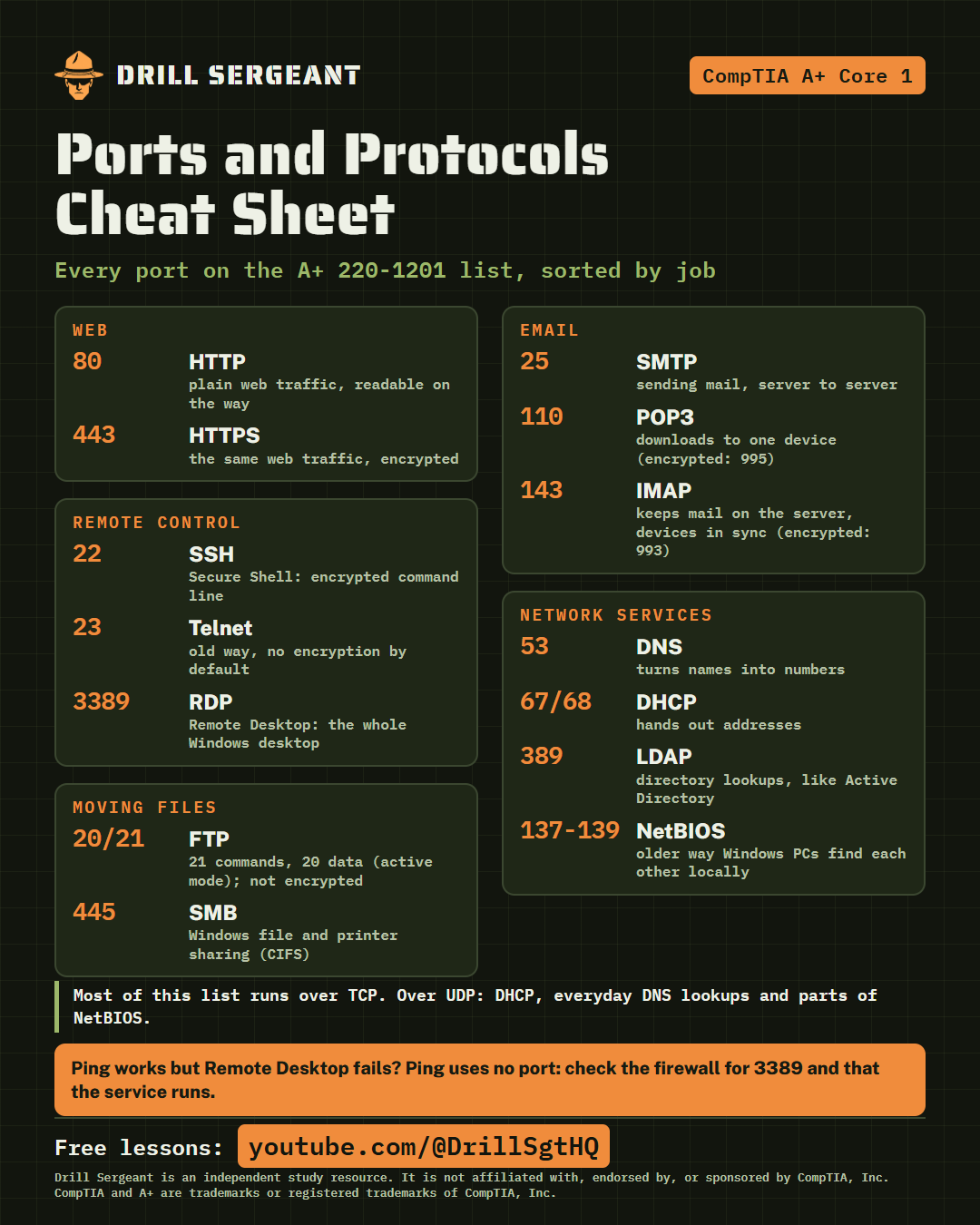
Cheat sheet as text
Ports and Protocols Cheat Sheet
Every port on the A+ 220-1201 list, sorted by job
Web
| Key | Meaning | Note |
|---|---|---|
| 80 | HTTP | plain web traffic, readable on the way |
| 443 | HTTPS | the same web traffic, encrypted |
Remote control
| Key | Meaning | Note |
|---|---|---|
| 22 | SSH | Secure Shell: encrypted command line |
| 23 | Telnet | old way, no encryption by default |
| 3389 | RDP | Remote Desktop: the whole Windows desktop |
Moving files
| Key | Meaning | Note |
|---|---|---|
| 20/21 | FTP | 21 commands, 20 data (active mode); not encrypted |
| 445 | SMB | Windows file and printer sharing (CIFS) |
| Key | Meaning | Note |
|---|---|---|
| 25 | SMTP | sending mail, server to server |
| 110 | POP3 | downloads to one device (encrypted: 995) |
| 143 | IMAP | keeps mail on the server, devices in sync (encrypted: 993) |
Network services
| Key | Meaning | Note |
|---|---|---|
| 53 | DNS | turns names into numbers |
| 67/68 | DHCP | hands out addresses |
| 389 | LDAP | directory lookups, like Active Directory |
| 137-139 | NetBIOS | older way Windows PCs find each other locally |
Most of this list runs over TCP. Over UDP: DHCP, everyday DNS lookups and parts of NetBIOS.
Ping works but Remote Desktop fails? Ping uses no port: check the firewall for 3389 and that the service runs.
Chapters
Exam objectives covered
- Core 1 (220-1201) objective 2.1, Networking
Transcript
Read the full lesson narration
What a port is
Fourteen protocols, eighteen port numbers. One exam objective. Let's make them stick.
In the last lesson, your computer found a server's IP address. But one server can run lots of programs at once: a website, email, file sharing. So how does your message reach the right one? With a port number. Think of the IP address as a company's main phone number, and the port as the extension. Same building, different desk. Port numbers run from zero to sixty five thousand, five hundred thirty five. One more thing. The numbers on the exam are defaults. A server can be set up to use a different port, so a port number is a strong hint, not proof.
TCP vs UDP
Every port on this list lives on top of TCP or UDP, the two main transport protocols. TCP sets up a connection, keeps everything in order, and resends what goes missing. UDP just sends, with no setup and no resends. Most of this list runs over TCP. For UDP, remember DHCP, everyday DNS lookups, and parts of NetBIOS. And one modern twist. HTTP three, the newest version of HTTP, runs over UDP, usually still on port four forty three. It uses a protocol called QUIC.
Web: 80 and 443
Let's sort the list by job. First, the web. Port eighty is HTTP, plain web traffic that anyone along the way could read. Port four forty three is HTTPS. The S stands for secure: the same web traffic, encrypted. Many browsers show a padlock for HTTPS, and HTTPS normally uses four forty three.
Remote control: 22, 23, 3389
Next, remote control, working on a computer you're not sitting at. Port twenty two is SSH. That stands for Secure Shell, an encrypted command line. Port twenty three is Telnet, the old way to do the same thing, with no encryption by default, so passwords cross the network in plain text. Twenty two is secure. Twenty three is not. And port thirty three eighty nine is RDP, the Remote Desktop Protocol, for seeing and controlling a whole Windows desktop.
Files: 20-21 and 445
Then, moving files. Ports twenty and twenty one are FTP, the File Transfer Protocol. Twenty one carries the commands, twenty carries the data in active mode, and like Telnet, it isn't encrypted. Port four forty five is SMB, Server Message Block, which Windows uses to share files and printers on a network. You may also see it called CIFS.
Email: 25, 110, 143
Email uses three. Port twenty five is SMTP, for sending mail, and for moving it between mail servers. To read your mail, there are two choices. POP3, on port one ten, downloads your messages to one device, and is often set to remove them from the server. IMAP, on port one forty three, keeps them on the server, so your phone and your laptop stay in sync. You may also see their encrypted versions: nine ninety three for IMAP, and nine ninety five for POP3.
Network services: 53, 67/68, 389, 137-139
Last, the services that keep a network running. You met two of them in the last lesson. Port fifty three is DNS, turning names into numbers. Ports sixty seven and sixty eight are DHCP, handing out addresses. Port three eighty nine is LDAP, the Lightweight Directory Access Protocol. It looks up users and computers in a directory, like Microsoft's Active Directory. And ports one thirty seven through one thirty nine are NetBIOS, an older way for Windows computers to find and talk to each other on a local network.
Firewalls and ports
Why does this matter on the job? Firewalls allow or block traffic by port. Say a user can't connect with Remote Desktop, but pinging the server works. Ping doesn't use a port at all, so a reply only shows the server answers ping. Check whether a firewall is blocking port thirty three eighty nine, and whether the Remote Desktop service is actually running.
Quick drill and full list
Quick drill. Say the answer before I do. An encrypted command line? Twenty two, SSH. Remote Desktop? Thirty three eighty nine. Sending email? Twenty five, SMTP. Turning names into numbers? Fifty three, DNS. Windows file sharing? Four forty five, SMB.
Here's the whole list, sorted by job. Pause the video if you want to copy it down. Then drill it until every number is automatic.
That's ports and protocols. Now go prove it. Practice questions are waiting for you in Drill Sergeant.
PRACTICE TESTS
Ready to drill it?
Practice tests for CompTIA A+ Core 1 and Core 2, every answer explained and checked against published sources. $19.95 for 30 days, plus sales tax where it applies; one payment, nothing renews.
See the 30-day passRelated lessons
Found a mistake in a lesson? Email support@drillsgthq.com with the lesson and what is wrong.
Drill Sergeant is an independent study resource. It is not affiliated with, endorsed by, or sponsored by CompTIA, Inc. CompTIA and A+ are trademarks or registered trademarks of CompTIA, Inc.