
What you will learn
- What A, AAAA, CNAME, MX and TXT records do
- How SPF, DKIM and DMARC fight spoofed email
- DHCP scopes, exclusions, reservations and leases
- How VLANs split one switch into separate networks
- Remote-access vs site-to-site VPNs
PRACTICE TESTS
Ready to drill it?
Practice tests for CompTIA A+ Core 1 and Core 2, every answer explained and checked against published sources. $19.95 for 30 days, plus sales tax where it applies; one payment, nothing renews.
See the 30-day passCheat sheet
Everything in this lesson on one page. Free to save, print and share.
Download the cheat sheet (PNG)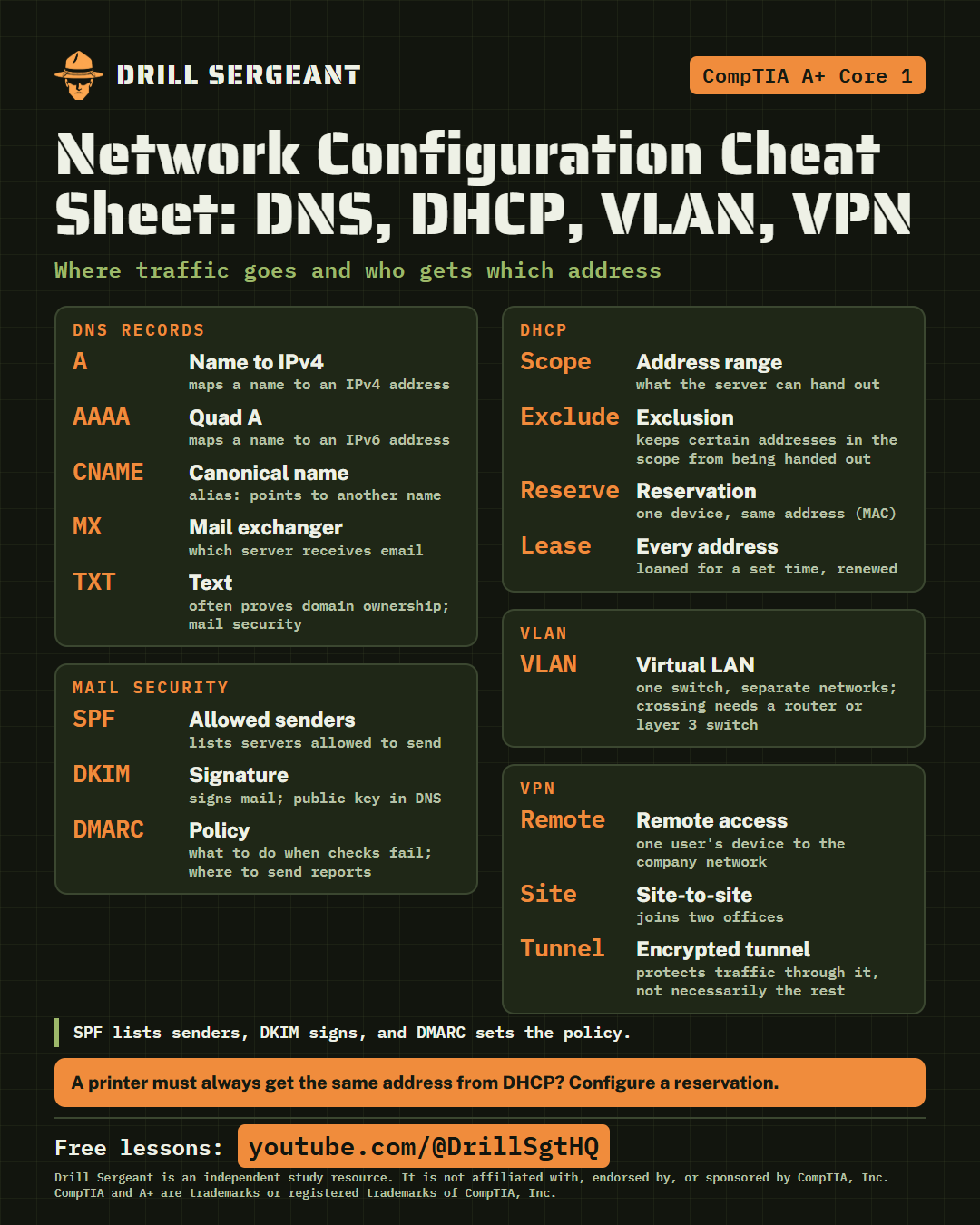
Cheat sheet as text
Network Configuration Cheat Sheet: DNS, DHCP, VLAN, VPN
Where traffic goes and who gets which address
DNS records
| Key | Meaning | Note |
|---|---|---|
| A | Name to IPv4 | maps a name to an IPv4 address |
| AAAA | Quad A | maps a name to an IPv6 address |
| CNAME | Canonical name | alias: points to another name |
| MX | Mail exchanger | which server receives email |
| TXT | Text | often proves domain ownership; mail security |
Mail security
| Key | Meaning | Note |
|---|---|---|
| SPF | Allowed senders | lists servers allowed to send |
| DKIM | Signature | signs mail; public key in DNS |
| DMARC | Policy | what to do when checks fail; where to send reports |
DHCP
- Scope — Address range: what the server can hand out
- Exclude — Exclusion: keeps certain addresses in the scope from being handed out
- Reserve — Reservation: one device, same address (MAC)
- Lease — Every address: loaned for a set time, renewed
VLAN
| Key | Meaning | Note |
|---|---|---|
| VLAN | Virtual LAN | one switch, separate networks; crossing needs a router or layer 3 switch |
VPN
- Remote — Remote access: one user's device to the company network
- Site — Site-to-site: joins two offices
- Tunnel — Encrypted tunnel: protects traffic through it, not necessarily the rest
SPF lists senders, DKIM signs, and DMARC sets the policy.
A printer must always get the same address from DHCP? Configure a reservation.
Chapters
Exam objectives covered
- Core 1 (220-1201) objective 2.4, Networking
Transcript
Read the full lesson narration
DNS records
A few settings decide where traffic goes, who can send mail as your domain, and who gets which address. Here are the configuration concepts every technician should recognize.
Start with DNS records. An A record maps a name to an IPv4 address. A quad A record, written as four A's, maps a name to an IPv6 address. A CNAME, or canonical name, is an alias that points one name at another. An MX record, the mail exchanger, says which server receives email for the domain. And a TXT record holds text, often used to prove you own a domain, and for mail security.
SPF, DKIM and DMARC
Three TXT-based records fight spam and spoofing. SPF, the Sender Policy Framework, lists the servers allowed to send mail for the domain. DKIM, DomainKeys Identified Mail, adds a digital signature to outgoing mail, and publishes the public key in DNS, so receivers can check that the domain signed it, and that it wasn't changed. And DMARC tells receiving servers what to do when a message fails those checks, like quarantine it or reject it, and where to send reports.
DHCP scopes, exclusions, reservations, leases
Next, DHCP. The scope is the range of addresses the server can hand out on a network. An exclusion keeps certain addresses in that range from being handed out, like ones already set by hand on servers and printers. A reservation always gives the same address to one specific device, identified by its MAC address. And every address is a lease: it's loaned for a set time, and the device renews it before it expires.
VLANs
A VLAN, a virtual LAN, splits one physical switch into separate logical networks. Accounting and engineering can share the same switch, but their traffic stays apart, and moving between VLANs needs a router or a layer 3 switch. It's a common way to separate departments, guests, phones, and IoT devices.
VPNs
And a VPN, a virtual private network, creates an encrypted tunnel across the internet. A remote-access VPN connects one user's device to the company network. A site-to-site VPN joins two offices. The tunnel protects the traffic that goes through it, but not necessarily everything else the device does.
Quick drill and recap
Drill time. Say the answer before I do. Which DNS record maps a name to an IPv6 address? A quad A record. A printer must always get the same address from DHCP. What do you configure? A reservation. Which record tells receiving servers what to do with mail that fails its checks? DMARC. Accounting and engineering share one switch, but must be on separate networks. What do you use? VLANs. Static servers use addresses inside the DHCP scope. What do you add so they aren't handed out? An exclusion.
Lock in these four. One. DNS: A, quad A, CNAME, MX, and TXT. Two. Mail: SPF lists senders, DKIM signs, and DMARC sets the policy. Three. DHCP: scope, exclusions, reservations, and leases. Four. VLANs separate networks on one switch, and a VPN tunnels across the internet.
That's network configuration. Now go prove it. Practice questions are waiting for you in Drill Sergeant.
PRACTICE TESTS
Ready to drill it?
Practice tests for CompTIA A+ Core 1 and Core 2, every answer explained and checked against published sources. $19.95 for 30 days, plus sales tax where it applies; one payment, nothing renews.
See the 30-day passRelated lessons
Found a mistake in a lesson? Email support@drillsgthq.com with the lesson and what is wrong.
Drill Sergeant is an independent study resource. It is not affiliated with, endorsed by, or sponsored by CompTIA, Inc. CompTIA and A+ are trademarks or registered trademarks of CompTIA, Inc.