
What you will learn
- The three private IPv4 ranges, and how NAT shares a public address
- How IPv6 addresses are written and shortened
- Static vs dynamic addresses, and what an APIPA address means
- What a subnet mask does
- Why a wrong gateway breaks internet access
PRACTICE TESTS
Ready to drill it?
Practice tests for CompTIA A+ Core 1 and Core 2, every answer explained and checked against published sources. $19.95 for 30 days, plus sales tax where it applies; one payment, nothing renews.
See the 30-day passCheat sheet
Everything in this lesson on one page. Free to save, print and share.
Download the cheat sheet (PNG)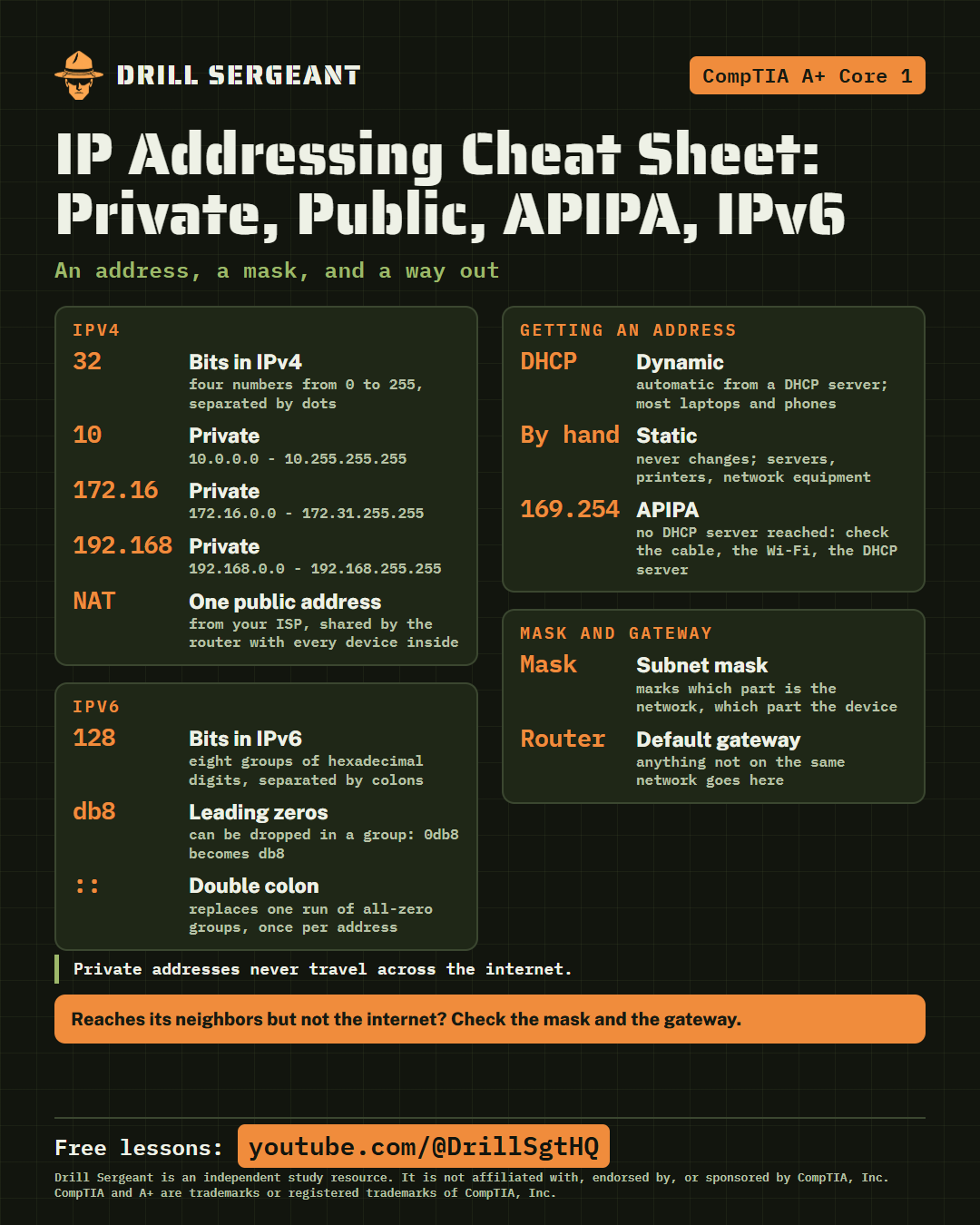
Cheat sheet as text
IP Addressing Cheat Sheet: Private, Public, APIPA, IPv6
An address, a mask, and a way out
IPv4
| Key | Meaning | Note |
|---|---|---|
| 32 | Bits in IPv4 | four numbers from 0 to 255, separated by dots |
| 10 | Private | 10.0.0.0 - 10.255.255.255 |
| 172.16 | Private | 172.16.0.0 - 172.31.255.255 |
| 192.168 | Private | 192.168.0.0 - 192.168.255.255 |
| NAT | One public address | from your ISP, shared by the router with every device inside |
IPv6
- 128 — Bits in IPv6: eight groups of hexadecimal digits, separated by colons
- db8 — Leading zeros: can be dropped in a group: 0db8 becomes db8
- :: — Double colon: replaces one run of all-zero groups, once per address
Getting an address
- DHCP — Dynamic: automatic from a DHCP server; most laptops and phones
- By hand — Static: never changes; servers, printers, network equipment
- 169.254 — APIPA: no DHCP server reached: check the cable, the Wi-Fi, the DHCP server
Mask and gateway
- Mask — Subnet mask: marks which part is the network, which part the device
- Router — Default gateway: anything not on the same network goes here
Private addresses never travel across the internet.
Reaches its neighbors but not the internet? Check the mask and the gateway.
Chapters
Exam objectives covered
- Core 1 (220-1201) objective 2.6, Networking
Transcript
Read the full lesson narration
IPv4, private and public addresses
Every device on a network needs an address, a mask, and a way out. Get those three right, and most small office networks just work.
An IPv4 address is thirty two bits, written as four numbers from zero to two fifty five, separated by dots. Some ranges are private, for use inside homes and offices: addresses starting with ten, with one seventy two dot sixteen through one seventy two dot thirty one, and with one ninety two dot one sixty eight. Private addresses never travel across the internet. Instead, the router shares one public address, assigned by your ISP, with every device inside, using NAT.
IPv6
IPv6 solves the shortage of IPv4 addresses. Each address is one hundred twenty eight bits, written as eight groups of hexadecimal digits, separated by colons. To shorten it, leading zeros in a group can be dropped, and one run of all-zero groups can be replaced by a double colon, once per address.
Static, dynamic and APIPA
Addresses are assigned in two ways. Dynamic addresses come automatically from a DHCP server, which suits most laptops and phones. A static address is typed in by hand, and never changes, which suits servers, printers, and network equipment. And if a device is set for DHCP but can't reach a server, it falls back to APIPA, giving itself an address starting with one sixty nine dot two fifty four. That's a clue: it can only reach nearby devices in that same range, so check the cable, the Wi-Fi, and the DHCP server.
Subnet masks and gateways
Finally, the subnet mask and the gateway. The mask marks which part of the address is the network, and which part is the device. With a mask of two fifty five dot two fifty five dot two fifty five dot zero, the first three numbers are the network. Devices on the same network talk directly. Anything else goes to the default gateway, the router, which forwards it on. A wrong mask or a wrong gateway is a classic reason a device reaches its neighbors, but not the internet.
Quick drill and recap
Drill time. Say the answer before I do. A laptop set for DHCP shows an address starting with one sixty nine dot two fifty four. What happened? It couldn't reach a DHCP server. Is an address starting with one seventy two dot twenty private or public? Private. A network printer must keep the same address without DHCP. How do you set it? Give it a static address. A PC can reach local devices, but not the internet. Which setting do you check? The default gateway. How many bits are in an IPv6 address? One hundred twenty eight.
Lock in these four. One. Private IPv4 ranges stay inside; NAT shares one public address. Two. IPv6 is one hundred twenty eight bits of hexadecimal. Three. Dynamic from DHCP, static by hand, and APIPA means DHCP failed. Four. The mask splits network from device, and the gateway is the way out.
That's IP addressing. Now go prove it. Practice questions are waiting for you in Drill Sergeant.
PRACTICE TESTS
Ready to drill it?
Practice tests for CompTIA A+ Core 1 and Core 2, every answer explained and checked against published sources. $19.95 for 30 days, plus sales tax where it applies; one payment, nothing renews.
See the 30-day passRelated lessons
Found a mistake in a lesson? Email support@drillsgthq.com with the lesson and what is wrong.
Drill Sergeant is an independent study resource. It is not affiliated with, endorsed by, or sponsored by CompTIA, Inc. CompTIA and A+ are trademarks or registered trademarks of CompTIA, Inc.