
What you will learn
- How fiber, cable and DSL differ, and what slows each one down
- Satellite latency, cellular data, and WISP line of sight
- PAN, LAN and WLAN: one person, one site, Wi-Fi
- MAN, WAN and the internet as the largest WAN
- What a storage area network (SAN) connects
PRACTICE TESTS
Ready to drill it?
Practice tests for CompTIA A+ Core 1 and Core 2, every answer explained and checked against published sources. $19.95 for 30 days, plus sales tax where it applies; one payment, nothing renews.
See the 30-day passCheat sheet
Everything in this lesson on one page. Free to save, print and share.
Download the cheat sheet (PNG)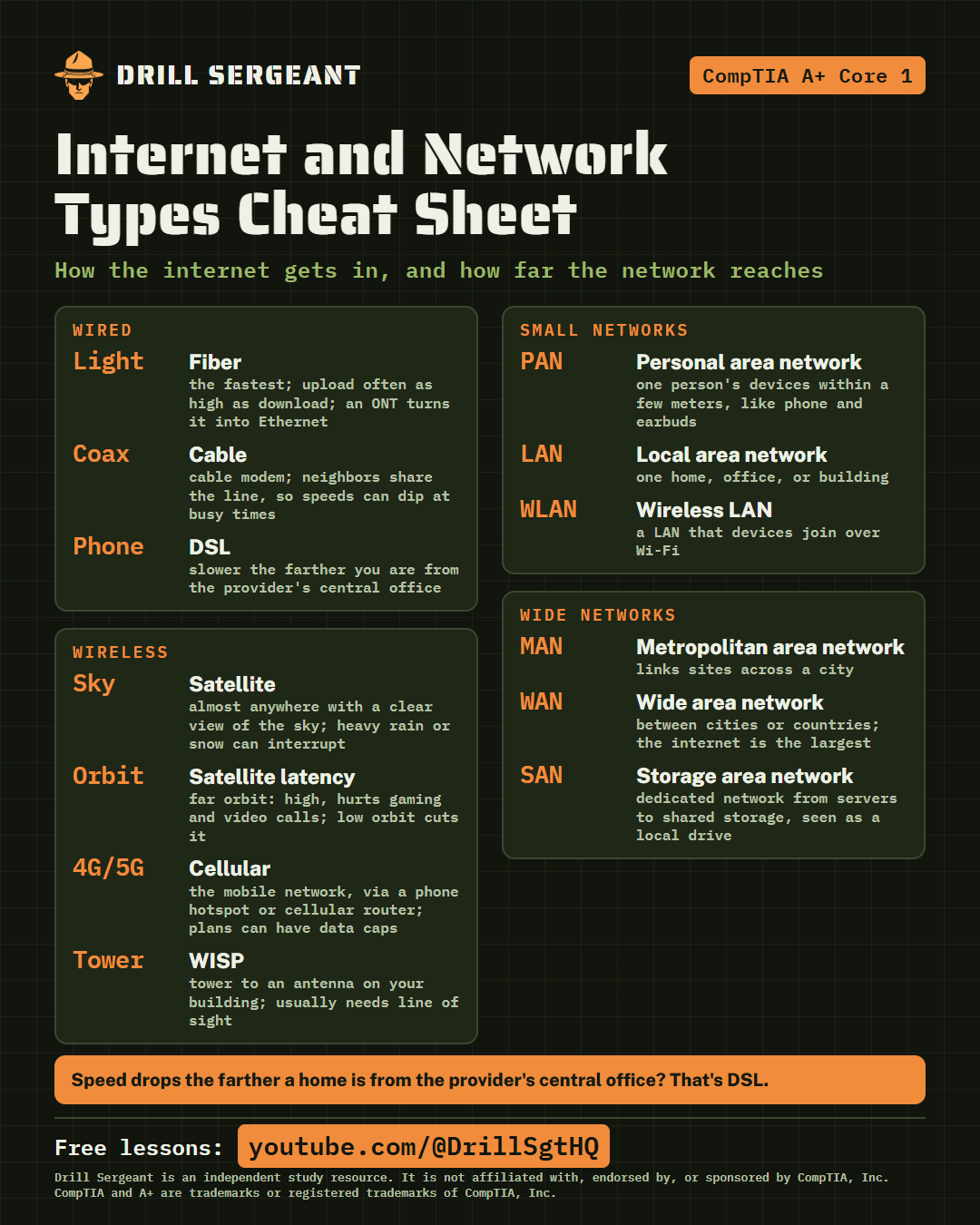
Cheat sheet as text
Internet and Network Types Cheat Sheet
How the internet gets in, and how far the network reaches
Wired
- Light — Fiber: the fastest; upload often as high as download; an ONT turns it into Ethernet
- Coax — Cable: cable modem; neighbors share the line, so speeds can dip at busy times
- Phone — DSL: slower the farther you are from the provider's central office
Wireless
- Sky — Satellite: almost anywhere with a clear view of the sky; heavy rain or snow can interrupt
- Orbit — Satellite latency: far orbit: high, hurts gaming and video calls; low orbit cuts it
- 4G/5G — Cellular: the mobile network, via a phone hotspot or cellular router; plans can have data caps
- Tower — WISP: tower to an antenna on your building; usually needs line of sight
Small networks
| Key | Meaning | Note |
|---|---|---|
| PAN | Personal area network | one person's devices within a few meters, like phone and earbuds |
| LAN | Local area network | one home, office, or building |
| WLAN | Wireless LAN | a LAN that devices join over Wi-Fi |
Wide networks
| Key | Meaning | Note |
|---|---|---|
| MAN | Metropolitan area network | links sites across a city |
| WAN | Wide area network | between cities or countries; the internet is the largest |
| SAN | Storage area network | dedicated network from servers to shared storage, seen as a local drive |
Speed drops the farther a home is from the provider's central office? That's DSL.
Chapters
Exam objectives covered
- Core 1 (220-1201) objective 2.7, Networking
Transcript
Read the full lesson narration
Wired: fiber, cable and DSL
Every network answers two questions: how the internet gets in, and how far the network reaches. Know both, and these exam questions get easy.
Start with wired connections. Fiber sends pulses of light through glass, and is the fastest, often with upload speeds as high as download. An ONT turns it into Ethernet. Cable internet uses the coaxial TV cable and a cable modem. Neighbors share the line, so speeds can dip at busy times. DSL uses the telephone line, and the farther you are from the provider's central office, the slower it gets.
Satellite, cellular and WISP
Where wires don't reach, there are three wireless options. Satellite works almost anywhere with a clear view of the sky. Traditional satellites orbit far above the Earth, so latency is high, which hurts gaming and video calls. Newer low orbit satellites cut that delay. Heavy rain or snow can interrupt the signal. Cellular uses the mobile network, 4G or 5G, through a phone hotspot or a cellular router, and plans can have data caps. And a WISP, a wireless internet service provider, beams internet from its tower to an antenna on your building. It usually needs a clear line of sight.
PAN, LAN and WLAN
Now the network types, from smallest to largest. A PAN, a personal area network, connects one person's devices within a few meters, like a phone and earbuds over Bluetooth. A LAN, a local area network, covers one home, office, or building. And a WLAN, a wireless LAN, is a LAN that devices join over Wi-Fi.
MAN, WAN and SAN
A MAN, a metropolitan area network, links sites across a city, like a city's libraries and offices. A WAN, a wide area network, connects networks across long distances, between cities or countries. The internet is the largest WAN. And a SAN, a storage area network, is a different kind: a dedicated network that connects servers to shared storage, so each server sees its share of that storage as a local drive.
Quick drill and recap
Drill time. Say the answer before I do. A rural home uses a dish, and video calls lag badly. Which connection type is it? Satellite. Internet speed drops the farther a home is from the provider's central office. Which connection type is it? DSL. An antenna on a building needs line of sight to the provider's tower. Which kind of provider is that? A WISP. A phone and wireless earbuds connect over Bluetooth. What network type is that? A PAN. Servers need a dedicated network to shared storage. What is it called? A SAN.
Lock in these four. One. Fiber is fastest, cable is shared coax, and DSL slows with distance. Two. Satellite can have high latency, cellular uses the mobile network, and a WISP needs line of sight. Three. PAN, LAN, WLAN: one person, one site, one site over Wi-Fi. Four. A MAN spans a city, a WAN spans the world, and a SAN connects servers to storage.
That's internet and network types. Now go prove it. Practice questions are waiting for you in Drill Sergeant.
PRACTICE TESTS
Ready to drill it?
Practice tests for CompTIA A+ Core 1 and Core 2, every answer explained and checked against published sources. $19.95 for 30 days, plus sales tax where it applies; one payment, nothing renews.
See the 30-day passRelated lessons
Found a mistake in a lesson? Email support@drillsgthq.com with the lesson and what is wrong.
Drill Sergeant is an independent study resource. It is not affiliated with, endorsed by, or sponsored by CompTIA, Inc. CompTIA and A+ are trademarks or registered trademarks of CompTIA, Inc.