
What you will learn
- What each of the 7 OSI layers does, in plain English
- Encapsulation: how data is wrapped on the way out and unwrapped on the way in
- Which devices live where: cables and hubs (Layer 1), switches (Layer 2), routers (Layer 3)
- TCP vs UDP and port numbers (Layer 4)
- Two mnemonics: Please Do Not Throw Sausage Pizza Away / All People Seem To Need Data Processing
PRACTICE TESTS
Ready to drill it?
Practice tests for CompTIA A+ Core 1 and Core 2, every answer explained and checked against published sources. $19.95 for 30 days, plus sales tax where it applies; one payment, nothing renews.
See the 30-day passCheat sheet
Everything in this lesson on one page. Free to save, print and share.
Download the cheat sheet (PNG)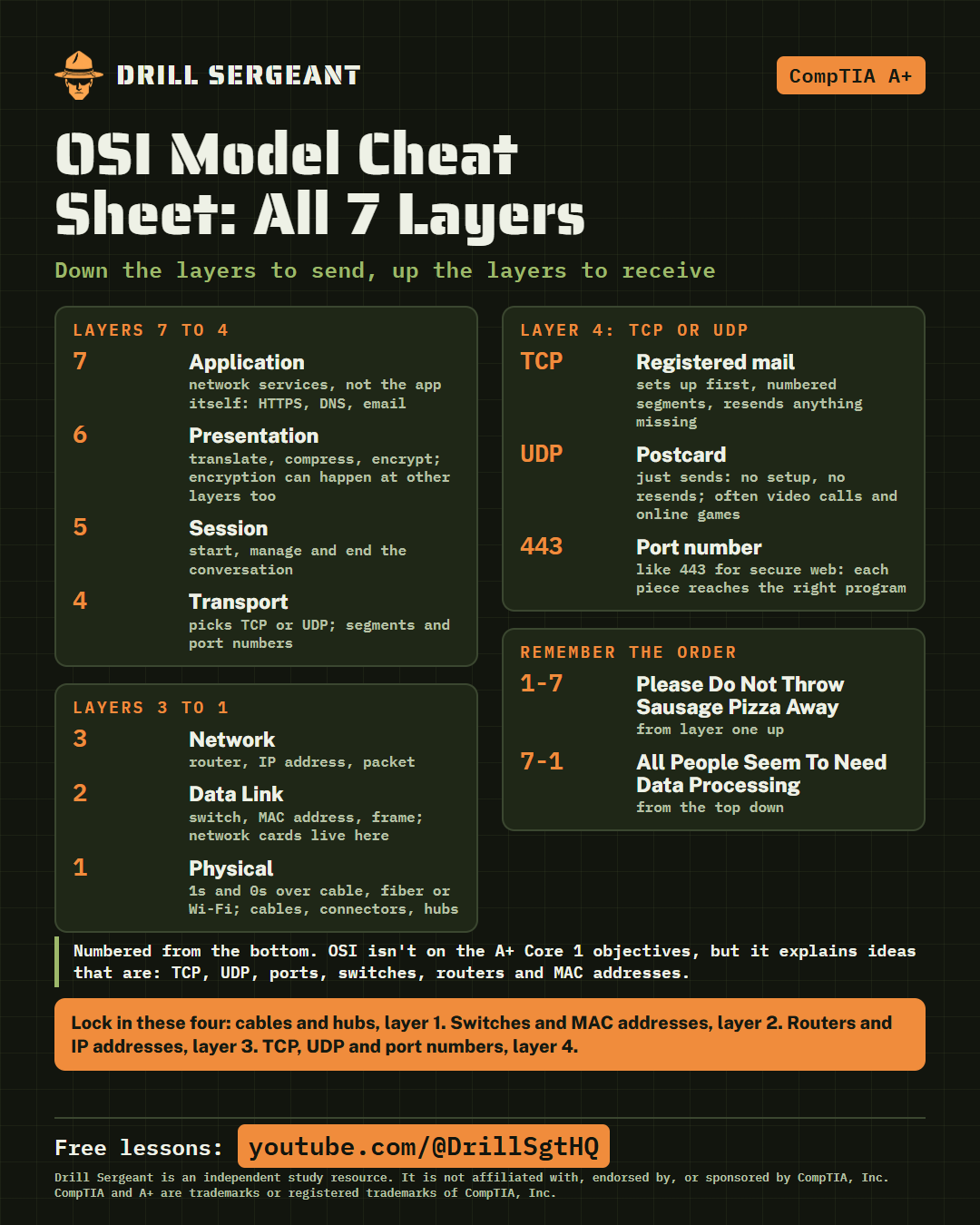
Cheat sheet as text
OSI Model Cheat Sheet: All 7 Layers
Down the layers to send, up the layers to receive
Layers 7 to 4
| Key | Meaning | Note |
|---|---|---|
| 7 | Application | network services, not the app itself: HTTPS, DNS, email |
| 6 | Presentation | translate, compress, encrypt; encryption can happen at other layers too |
| 5 | Session | start, manage and end the conversation |
| 4 | Transport | picks TCP or UDP; segments and port numbers |
Layers 3 to 1
| Key | Meaning | Note |
|---|---|---|
| 3 | Network | router, IP address, packet |
| 2 | Data Link | switch, MAC address, frame; network cards live here |
| 1 | Physical | 1s and 0s over cable, fiber or Wi-Fi; cables, connectors, hubs |
Layer 4: TCP or UDP
| Key | Meaning | Note |
|---|---|---|
| TCP | Registered mail | sets up first, numbered segments, resends anything missing |
| UDP | Postcard | just sends: no setup, no resends; often video calls and online games |
| 443 | Port number | like 443 for secure web: each piece reaches the right program |
Remember the order
| Key | Meaning | Note |
|---|---|---|
| 1-7 | Please Do Not Throw Sausage Pizza Away | from layer one up |
| 7-1 | All People Seem To Need Data Processing | from the top down |
Numbered from the bottom. OSI isn't on the A+ Core 1 objectives, but it explains ideas that are: TCP, UDP, ports, switches, routers and MAC addresses.
Lock in these four: cables and hubs, layer 1. Switches and MAC addresses, layer 2. Routers and IP addresses, layer 3. TCP, UDP and port numbers, layer 4.
Chapters
- 0:00Seven layers, one click
- 0:55Layer 7: Application
- 1:19Layer 6: Presentation
- 1:42Layer 5: Session
- 2:01Layer 4: Transport (TCP vs UDP, ports)
- 2:37Layer 3: Network (routers, IP)
- 2:58Layer 2: Data Link (switches, MAC)
- 3:21Layer 1: Physical
- 3:42Across the wire
- 4:02Unwrapping at the server
- 4:59Mnemonics to remember the order
- 5:24Recap
Transcript
Read the full lesson narration
Seven layers, one click
Seven layers. One click. Let's break down the OSI model, in plain English.
Here's the setup. You click Play on a training video. Before that video starts, your request makes a trip. It goes down seven layers on your laptop, crosses the wire, and climbs up seven layers on the server. Think of it like mailing a letter through a big company mailroom. Each desk does one job, and most add a label. Watch the dot. That's your message. Each ring that wraps around it is one of those labels, added at layers four, three, and two. One quick note: the layers are numbered from the bottom. Layer one is Physical. Layer seven is Application. And for the record, the OSI model isn't on the A+ Core 1 objectives, but it explains ideas that are: TCP, UDP, ports, switches, routers, and MAC addresses.
Layer 7: Application
We start at the top. Layer seven, Application. This is you writing the letter. Your web browser creates a request that basically says: send me lesson one. Layer seven isn't the app itself. It's the network services the app uses: secure web traffic called HTTPS, name lookups called DNS, and email.
Layer 6: Presentation
Layer six, Presentation. This is the translator. It puts your message in a format both sides understand. In this model, it's also where compression and encryption are pictured, so nobody can read it along the way. Translate, compress, encrypt. If a question talks about data format or translation, think layer six. Encryption itself can happen at other layers too.
Layer 5: Session
Layer five, Session. Before letters go back and forth, both offices open a case file, so every message belongs to the same conversation. Your computer opens a session with the server and keeps track of it, so the conversation stays organized. Session means start, manage, and end the conversation.
Layer 4: Transport (TCP vs UDP, ports)
Layer four, Transport. This is the shipping desk. First, it picks a service. TCP is registered mail: it sets up the delivery first, splits your request into numbered pieces called segments, and resends anything that goes missing. UDP is a postcard: it just sends, with no setup and no resends. That's why video calls and online games often use UDP: a late piece is no use anyway. Either way, each piece gets a port number, like four forty three for secure web, so it reaches the right program.
Layer 3: Network (routers, IP)
Layer three, Network. Now the street address goes on the envelope. Every piece gets stamped with an IP address. Routers across the internet are like post offices. They read that IP address and pass the packet along, one hop at a time. Remember: router, IP address, packet. All layer three.
Layer 2: Data Link (switches, MAC)
Layer two, Data Link. This is the local mail carrier, who only cares about the next stop on the street. So the packet gets wrapped in a frame, with the MAC address of the next device, usually your home router. A check value goes on the end, to catch any damage. Switches and network cards live here. Switch, MAC address, frame. Layer two.
Layer 1: Physical
And layer one, Physical. The truck and the road. Everything becomes ones and zeros, sent as electrical pulses on a cable, light through fiber, or radio waves over Wi-Fi. Cables, connectors, and hubs are all layer one. And layer one is a great first check when troubleshooting. Is it plugged in?
Across the wire
Now the bits cross the wire. Through your Wi-Fi, your internet provider, and a chain of routers, each one peeking at the IP address to choose the next hop. Each router also puts the packet in a new frame, with new MAC addresses, but the IP address stays the same. To the wire, it's all just ones and zeros.
Unwrapping at the server
At the server, everything happens in reverse. Layer one. The network card hears the signals, and turns them back into ones and zeros.
Layer two. The card sees its own MAC address on the frame, checks that nothing got damaged, and peels off that wrapper.
Layer three. The server confirms the IP address is its own, and removes that label.
Layer four. It reads the port number, four forty three, so the request goes to the web service. Then it puts the numbered pieces back in order, and confirms what arrived, so your laptop can resend anything missing.
Layer five. The request is matched to the open session, so it's handled as part of the same conversation.
Layer six. The message is decrypted, and turned back into plain data.
And layer seven. The web server reads the request. Send me lesson one. And the video starts streaming back to you, making the same trip in the other direction.
Mnemonics to remember the order
So here's the big idea. Down the layers to send, wrapping as you go. Up the layers to receive, unwrapping as you go. To remember the order from layer one up: Please Do Not Throw Sausage Pizza Away. Physical, Data Link, Network, Transport, Session, Presentation, Application. Or from the top down: All People Seem To Need Data Processing.
Recap
Lock in these four. Cables and hubs, layer one. Switches and MAC addresses, layer two. Routers and IP addresses, layer three. TCP, UDP, and port numbers, layer four.
That's the OSI model. Now go prove it. Practice questions are waiting for you at Drill Sergeant.
PRACTICE TESTS
Ready to drill it?
Practice tests for CompTIA A+ Core 1 and Core 2, every answer explained and checked against published sources. $19.95 for 30 days, plus sales tax where it applies; one payment, nothing renews.
See the 30-day passRelated lessons
Found a mistake in a lesson? Email support@drillsgthq.com with the lesson and what is wrong.
Drill Sergeant is an independent study resource. It is not affiliated with, endorsed by, or sponsored by CompTIA, Inc. CompTIA and A+ are trademarks or registered trademarks of CompTIA, Inc.