
What you will learn
- HDD spindle speeds and 3.5-inch vs 2.5-inch drives, and how SSDs differ
- SATA, NVMe over PCIe and SAS; why M.2 is a shape, not a speed
- RAID 0, 1, 5, 6 and 10: minimum drives, failures survived, usable space
- What parity is, and why a second failure during a RAID 5 rebuild is dangerous
- Why RAID is not a backup
PRACTICE TESTS
Ready to drill it?
Practice tests for CompTIA A+ Core 1 and Core 2, every answer explained and checked against published sources. $19.95 for 30 days, plus sales tax where it applies; one payment, nothing renews.
See the 30-day passCheat sheet
Everything in this lesson on one page. Free to save, print and share.
Download the cheat sheet (PNG)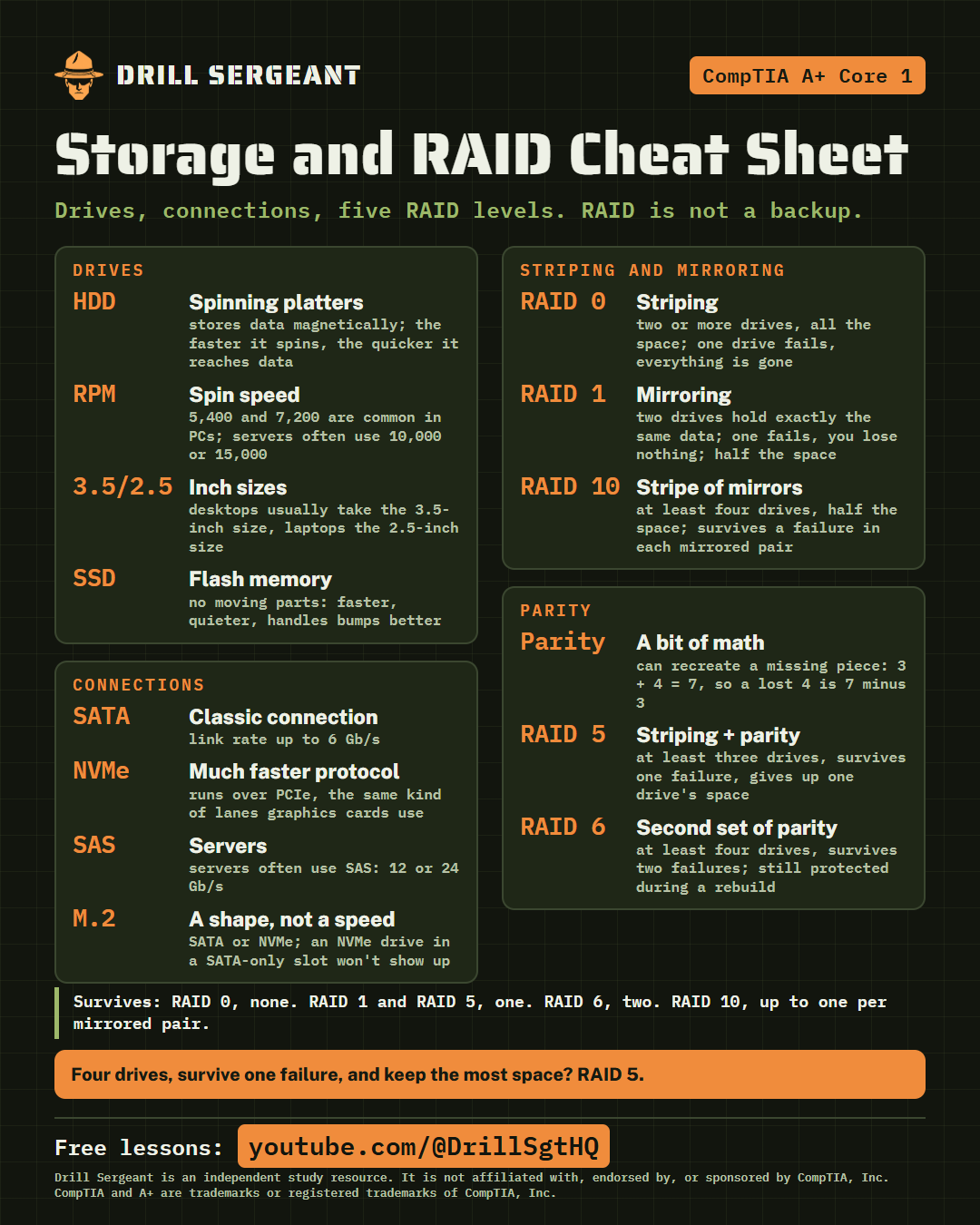
Cheat sheet as text
Storage and RAID Cheat Sheet
Drives, connections, five RAID levels. RAID is not a backup.
Drives
| Key | Meaning | Note |
|---|---|---|
| HDD | Spinning platters | stores data magnetically; the faster it spins, the quicker it reaches data |
| RPM | Spin speed | 5,400 and 7,200 are common in PCs; servers often use 10,000 or 15,000 |
| 3.5/2.5 | Inch sizes | desktops usually take the 3.5-inch size, laptops the 2.5-inch size |
| SSD | Flash memory | no moving parts: faster, quieter, handles bumps better |
Connections
| Key | Meaning | Note |
|---|---|---|
| SATA | Classic connection | link rate up to 6 Gb/s |
| NVMe | Much faster protocol | runs over PCIe, the same kind of lanes graphics cards use |
| SAS | Servers | servers often use SAS: 12 or 24 Gb/s |
| M.2 | A shape, not a speed | SATA or NVMe; an NVMe drive in a SATA-only slot won't show up |
Striping and mirroring
| Key | Meaning | Note |
|---|---|---|
| RAID 0 | Striping | two or more drives, all the space; one drive fails, everything is gone |
| RAID 1 | Mirroring | two drives hold exactly the same data; one fails, you lose nothing; half the space |
| RAID 10 | Stripe of mirrors | at least four drives, half the space; survives a failure in each mirrored pair |
Parity
- Parity — A bit of math: can recreate a missing piece: 3 + 4 = 7, so a lost 4 is 7 minus 3
- RAID 5 — Striping + parity: at least three drives, survives one failure, gives up one drive's space
- RAID 6 — Second set of parity: at least four drives, survives two failures; still protected during a rebuild
Survives: RAID 0, none. RAID 1 and RAID 5, one. RAID 6, two. RAID 10, up to one per mirrored pair.
Four drives, survive one failure, and keep the most space? RAID 5.
Chapters
Exam objectives covered
- Core 1 (220-1201) objective 3.4, Hardware
Transcript
Read the full lesson narration
Hard drives vs SSDs
One drive fails. Do you lose everything? That depends on your RAID level.
Start with the drives themselves. A hard disk drive, or HDD, stores data magnetically on spinning platters. The faster it spins, the quicker it can reach your data. 5,400 and 7,200 RPM are common in PCs, and servers often use 10,000 or 15,000. Desktops usually take the 3.5-inch size, and laptops the 2.5-inch size. A solid state drive, or SSD, uses flash memory instead. No moving parts, so it's faster, quieter, and handles bumps better.
SATA, NVMe, PCIe, SAS, M.2 and mSATA
How a drive connects matters too. SATA is the classic connection, with a link rate of up to six gigabits per second. NVMe is a much faster protocol that runs over PCIe, the same kind of lanes graphics cards use. Servers often use SAS. Now the trap. M.2 is a shape, a small stick that plugs straight into the motherboard. It's not a speed. An M.2 drive can be SATA or NVMe, and the slot has to support the same kind. Put an NVMe drive in a slot that only supports SATA, and it won't show up. You'll also see mSATA, an older, smaller card. For removable storage, there are flash drives and memory cards. And the exam also lists optical drives.
What RAID is
Now, RAID. A redundant array of independent disks combines several drives into one. Depending on the level, you get more speed, more safety, or both. The exam asks about five levels: zero, one, five, six, and ten. For each one, ask three questions. How many drives does it need? How many can fail? And how much space do you actually get?
RAID 0: striping
RAID 0 is striping. Your data is split into pieces, and the pieces are spread across two or more drives, so they can work at the same time. It can be fast, and you get all the space. But there's no copy. If one drive fails, everything is gone. Zero redundancy. An easy way to remember the zero in RAID 0.
RAID 1: mirroring
RAID 1 is mirroring. Two drives hold exactly the same data. If one fails, the other keeps going, and you lose nothing. The cost is space. You only get half. Two one-terabyte drives give you one terabyte.
RAID 5: parity
RAID 5 stripes the data, and adds parity. Parity is a bit of math that can recreate a missing piece. Think of it like this. If you know that three plus four is seven, and the four goes missing, you can work it out: seven minus three. RAID 5 spreads that parity across all the drives. It needs at least three drives, survives one failure, and gives up one drive's worth of space for the parity.
RAID 6: double parity
RAID 6 adds a second set of parity. It needs at least four drives, and it can survive two failures. That matters during a rebuild. When a RAID 5 array is rebuilding after one failure, a second failure loses the array. RAID 6 still has a spare layer of protection.
RAID 10: a stripe of mirrors
RAID 10 is a stripe of mirrors. Drives are paired up as mirrors, then the data is striped across the pairs. It needs at least four drives, and you get half the space. It can survive a failure in each mirrored pair. But if both drives in the same pair fail, the array is lost.
RAID is not a backup, drill and table
One rule beats all the others. RAID is not a backup. RAID protects you from a failed drive, not from a deleted file. Delete a file by mistake, or let ransomware encrypt it, and the array keeps that damage, perfectly protected. You still need a separate backup, kept offline, that you've tested.
Quick drill. Say the answer before I do. Fastest, with no protection at all? RAID 0. Two drives, an exact copy? RAID 1. Four drives, survive one failure, and keep the most space? RAID 5. Must survive two failed drives? RAID 6. Mirrors, then striping, with at least four drives? RAID 10.
Here's the whole table. Minimum drives, failures it survives, and the space you get. Pause the video if you want to copy it down.
That's storage and RAID. Now go prove it. Practice questions are waiting for you in Drill Sergeant.
PRACTICE TESTS
Ready to drill it?
Practice tests for CompTIA A+ Core 1 and Core 2, every answer explained and checked against published sources. $19.95 for 30 days, plus sales tax where it applies; one payment, nothing renews.
See the 30-day passRelated lessons
Found a mistake in a lesson? Email support@drillsgthq.com with the lesson and what is wrong.
Drill Sergeant is an independent study resource. It is not affiliated with, endorsed by, or sponsored by CompTIA, Inc. CompTIA and A+ are trademarks or registered trademarks of CompTIA, Inc.