
What you will learn
- USB 2.0 vs 3.0 speeds, and Type-A, Mini, Micro and USB-C plugs
- Thunderbolt, Lightning and DB9 serial connectors
- VGA vs DVI vs HDMI vs DisplayPort, and video over USB-C
- SATA data and power, eSATA and Molex
- When an adapter is enough and when you need an active converter
PRACTICE TESTS
Ready to drill it?
Practice tests for CompTIA A+ Core 1 and Core 2, every answer explained and checked against published sources. $19.95 for 30 days, plus sales tax where it applies; one payment, nothing renews.
See the 30-day passCheat sheet
Everything in this lesson on one page. Free to save, print and share.
Download the cheat sheet (PNG)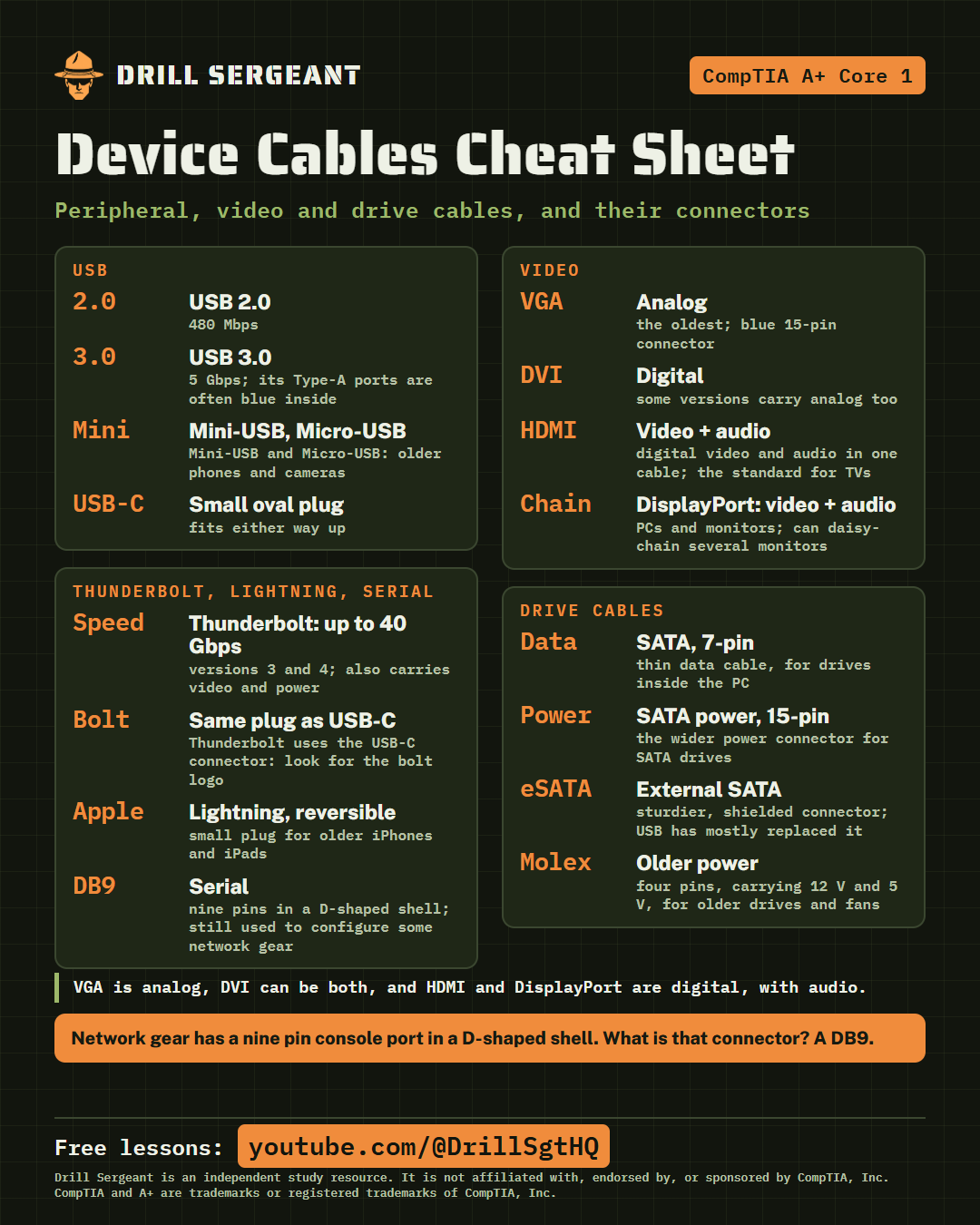
Cheat sheet as text
Device Cables Cheat Sheet
Peripheral, video and drive cables, and their connectors
USB
- 2.0 — USB 2.0: 480 Mbps
- 3.0 — USB 3.0: 5 Gbps; its Type-A ports are often blue inside
- Mini — Mini-USB, Micro-USB: Mini-USB and Micro-USB: older phones and cameras
- USB-C — Small oval plug: fits either way up
Thunderbolt, Lightning, serial
- Speed — Thunderbolt: up to 40 Gbps: versions 3 and 4; also carries video and power
- Bolt — Same plug as USB-C: Thunderbolt uses the USB-C connector: look for the bolt logo
- Apple — Lightning, reversible: small plug for older iPhones and iPads
- DB9 — Serial: nine pins in a D-shaped shell; still used to configure some network gear
Video
- VGA — Analog: the oldest; blue 15-pin connector
- DVI — Digital: some versions carry analog too
- HDMI — Video + audio: digital video and audio in one cable; the standard for TVs
- Chain — DisplayPort: video + audio: PCs and monitors; can daisy-chain several monitors
Drive cables
- Data — SATA, 7-pin: thin data cable, for drives inside the PC
- Power — SATA power, 15-pin: the wider power connector for SATA drives
- eSATA — External SATA: sturdier, shielded connector; USB has mostly replaced it
- Molex — Older power: four pins, carrying 12 V and 5 V, for older drives and fans
VGA is analog, DVI can be both, and HDMI and DisplayPort are digital, with audio.
Network gear has a nine pin console port in a D-shaped shell. What is that connector? A DB9.
Chapters
Exam objectives covered
- Core 1 (220-1201) objective 3.2, Hardware
Transcript
Read the full lesson narration
USB versions and plugs
Cables connect more than networks. Displays, drives, and peripherals each have their own, and the exam expects you to know them on sight.
Start with USB, the universal serial bus. USB 2.0 runs at four hundred eighty megabits per second. USB 3.0 runs at five gigabits, and its Type-A ports are often blue inside. The plug shapes changed over time: Type-A, the flat rectangle on the computer; Mini-USB and Micro-USB, smaller plugs on older phones and cameras; and USB-C, the small oval plug that fits either way up.
Thunderbolt, Lightning and DB9 serial
Thunderbolt runs much faster, up to forty gigabits in versions three and four, and it also carries video and power. Today it uses the same USB-C connector, so look for the bolt logo. Two more connectors finish the list. Lightning is Apple's small, reversible plug for older iPhones and iPads. And serial ports use a DB9 connector: nine pins in a D-shaped shell, still used to configure some network gear.
VGA, DVI, HDMI, DisplayPort and USB-C video
Video has four cables to know. VGA is the oldest: analog video, with a blue fifteen pin connector. DVI came next, and carries digital video, and on some versions analog too. HDMI carries digital video and audio in one cable, and is the standard for TVs. DisplayPort is common on PCs and monitors, carries audio too, and can daisy-chain several monitors. And USB-C can carry video as well, but only on ports that support DisplayPort.
SATA, eSATA and Molex
Inside the PC, drives connect with SATA: a thin seven pin data cable, plus a wider fifteen pin power connector. eSATA is the external version, with a sturdier, shielded connector, though USB has mostly replaced it. And older drives and fans used a Molex connector: four pins, carrying twelve and five volts.
Adapters and converters
When the ends don't match, use an adapter: HDMI to DVI, DisplayPort to HDMI, or USB-C to almost anything. Remember, an adapter changes the shape, but it can't add a signal the source doesn't send. A digital port needs an active converter to drive an analog VGA monitor.
Quick drill and recap
Drill time. Say the answer before I do. A new laptop has only small oval ports that fit either way up. What connector type is that? USB-C. A TV needs picture and sound from a PC over one cable. Which interface is the standard? HDMI. An old projector accepts only analog video. Which connector does it use? VGA. Network gear has a nine pin console port in a D-shaped shell. What is that connector? A DB9. A desktop drive needs a data cable to the motherboard. Which interface is it most likely? SATA.
Lock in these four. One. USB 2.0 is four hundred eighty megabits, 3.0 is five gigabits, and USB-C fits either way up. Two. Thunderbolt runs forty gigabits over USB-C; Lightning is Apple's; DB9 is serial. Three. VGA is analog, DVI can be both, and HDMI and DisplayPort are digital, with audio. Four. SATA inside, eSATA outside, and Molex for older power.
That's device cables and connectors. Now go prove it. Practice questions are waiting for you in Drill Sergeant.
PRACTICE TESTS
Ready to drill it?
Practice tests for CompTIA A+ Core 1 and Core 2, every answer explained and checked against published sources. $19.95 for 30 days, plus sales tax where it applies; one payment, nothing renews.
See the 30-day passRelated lessons
Found a mistake in a lesson? Email support@drillsgthq.com with the lesson and what is wrong.
Drill Sergeant is an independent study resource. It is not affiliated with, endorsed by, or sponsored by CompTIA, Inc. CompTIA and A+ are trademarks or registered trademarks of CompTIA, Inc.